
Increase Your Comfort and Safety
The Medical Information Form is easy to use and will help you keep track of your medications, vitamins, and supplements. It folds up neatly into your wallet or pocket, and you can change it as often as you need to. And, best of all, it is absolutely free!
Few people remember the names and dosages of the medications, vitamins, and supplements they take. Even fewer realize that it can be deadly to mix certain medications with over-the-counter medicines. By keeping a list of all medications, your pharmacist and doctors can make sure that it is safe to take them together.
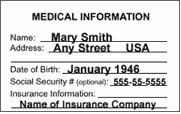
The Medical Information Form, or MedForm, is form is designed to fit onto one page that is folded to the size of a credit card. This document is intended to be printed on both sides (double-sided). It can be used as two pages or printed as a two-sided document.
- Take a copy of the updated form with you whenever you leave your home and know where your latest version is at all times.
- Keep a copy in your wallet, handbag, or backpack.
- If you live alone have a copy near the most noticeable phone in your home.
- Have your doctor’s staff make a copy of it for your chart.
- Make sure your pharmacist and dentist also have a current copy.
Download the Medical Information Form
Click one of the links below to download the file. Save it on your Desktop or in a file such as “My Documents.”.
Word Document
Ideal for Microsoft Office or Word and can be opened as a Rich Text File in other applications. You can edit your medications on the computer and then print out a copy of the MedForm.
Download the Word Document
Adobe PDF File
Use this one only if you can’t open the MSWord Doc. You’ll have to print out a blank copy and fill it out by hand.
Download the Adobe PDF File
Tips for New Computer Users
- When you click to download the MedForm, you will see a box pop up that asks you whether you’d like to Open or Save the file. Chose the Save option.
- Save it in a location you can easily remember. Two of the best places are your desktop or, for Windows users, in “My Documents” Folder.
Note: When you copy the form from this page onto your computer no one except those you decide to give a copy of the completed form to will be able to see your private medical information.
Collect Your Medications
Take a tour of your home. Gather up all the medications, herbs, vitamins and supplements you take on a regular basis. After you’ve collected all the bottles, set them out on the table and take a big breath.
Make a List
List the name, dosage, and how often you take the medication. The time invested in filling out the form is not fun. It forces us to confront unpleasant realities. Nevertheless, that investment of a few uncomfortable minutes can increase your safety and feeling of security. You are now ready to copy the names onto the form.
Complete the Form
Fill in the Medical Information Form and give copies to your family members and medical team. Space has been left for those who have special needs or who want to list the person named in their Durable Power for Health Care Decisions, a legal document that spells out your wishes about medical treatment if you are unable to speak for yourself.
Print Out Your Form
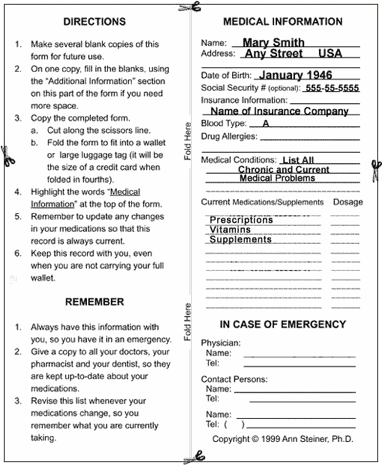
This form is designed to fit onto one page that is folded to the size of a credit card. This document is intended to be printed on both sides (double-sided). It can be used as two pages or printed as a two-sided document. Refer to your printer’s manual for directions to print double-sided.
If you don’t want to copy the form onto your computer, but want a copy of the blank form, simply print the PDF form.
Share Your Form
Tell family members and anyone who assists you where the file is stored on your computer so they can get the latest information in the event of an emergency. The form is especially important for children and adults who are taking prescription medications. Having the latest list saves the doctor’s time and can speed appropriate treatment in an emergency.
Update Your Form Regularly
Keep this form as up to date as possible. Every time you change medications, supplements or dosages, it is important to write the new information on your Medical Information Form. Once you copy the form onto your computer no one except those you decide to give a copy of the completed form to will be able to see your private medical information.
Case Studies
Yvonne
Yvonne, a recently divorced woman in her 40’s decided to get “back in shape.” Part of her routine was to go for long walks on a local bike path. One afternoon she simply collapsed. Paramedics were unable to help her and had no information about who to contact in an emergency. This tragedy could have been avoided if she had had a MedForm in her pocket along with her keys.
Amy
Amy, a 35-year-old bank teller, joined her local gym and began taking exercise classes. After a few months, she learned her heartburn was a symptom of a mild heart problem, and she began taking heart medication. After she had the flu, she started taking supplements advertised as energy boosters. When she showed her MedForm to her doctor, he explained that the combination of her heart medications and supplements could cause permanent heart damage.
Senior Patient
An older patient described a recent episode with paramedics and ambulance staff: “I didn’t want them bothering me and asking me questions. They wanted to know my insurance numbers, which I always know, but I botched it, and that got me even more upset.” The MedForm could have saved embarrassment and helped get proper medical care faster.